
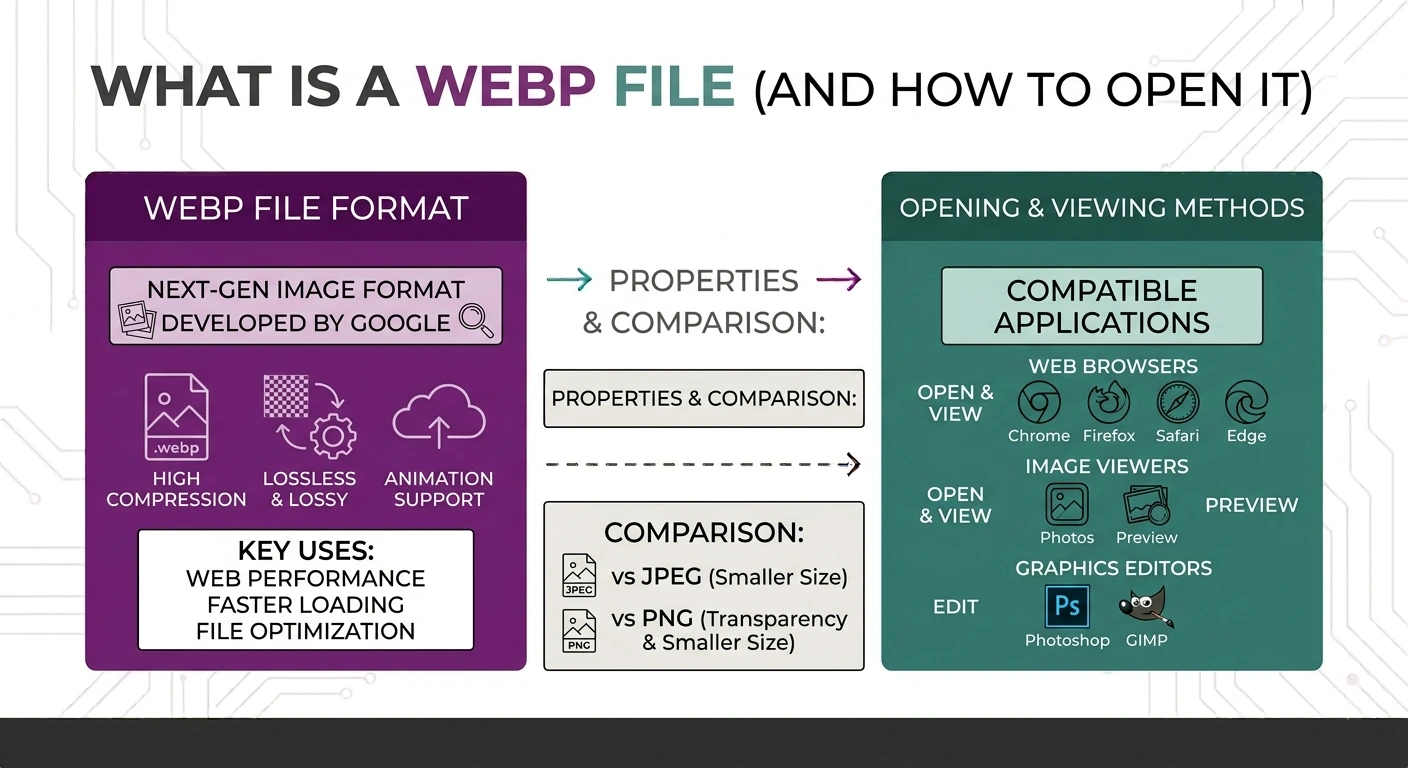
What is a WEBP file? It is an image saved in the WebP format, which was created by Google. It stores photos, logos, and graphics at a much smaller file size than JPG or PNG, and it still looks sharp. Most of the time, you get a WEBP file when you save an image from a website because site owners use this format to make their pages load faster.
If you just downloaded a picture and it ended in “.webp,” you are in the right place. In this guide you will learn what a WEBP file is, why so many websites use it, how it compares to JPG and PNG, and the easiest free ways to open or convert a WEBP file on any device.
What Is a WEBP File, Exactly?
So what is a WEBP file in plain words? It is Google’s answer to large image files. The name “WebP” is short for “Web Picture.” It is a modern image format that Google first released back in 2010. Google built it to fix one common problem. Old formats like JPG and PNG produce good images, but the files can be large. Large images make web pages slow to load. WebP keeps the picture quality high while cutting the file size by a lot.
One thing that makes a WEBP file special is how flexible it is. A single WebP file can behave in different ways:
- It can be lossy, like a JPG, which is perfect for photos.
- It can be lossless, like a PNG, which is perfect for logos and sharp graphics.
- It can hold transparency, so the background can be see-through, just like a PNG.
- It can even hold animation, the way a GIF does.
So one file type covers photos, flat graphics, and simple animations. That is a big reason Google pushed the format so hard. You can read the full technical details on the official Google WebP page.
According to Google, a WEBP file is often around 25 to 34 percent smaller than a JPG at the same quality. Lossless WebP files are usually about 26 percent smaller than a matching PNG. Smaller files mean faster pages and lower data use, which is a big deal on phones and slow connections.
Why Do So Many Websites Use WEBP?
Website speed affects everything. It changes how long visitors stay, how happy they feel, and even how the site ranks on Google. Since a WebP file is smaller, pages built with WebP images simply load quicker.
Here is why site owners like the format so much:
- Faster loading. Smaller images use less bandwidth, so pages appear sooner.
- Better mobile experience. Mobile users often have limited data, and WebP saves data.
- One format for many jobs. They do not need separate PNG and JPG files. A WEBP file can do both jobs.
- Good for SEO. Faster pages tend to please both users and search engines.
The only downside is compatibility. Every modern web browser can show a WEBP file today, including Chrome, Firefox, Edge, and Safari. But some older apps, some older photo viewers, and a few social media upload tools still do not accept the format. That is exactly why people search for a way to open or convert one.
WEBP vs JPG vs PNG: A Quick Comparison
Before you decide what to do with your WEBP file, it helps to see how the three formats stack up. This simple table makes it clear.
| Feature | WEBP | JPG | PNG |
|---|---|---|---|
| File size | Smallest | Medium | Largest |
| Best for | Web images | Photos | Logos, graphics, screenshots |
| Transparency | Yes | No | Yes |
| Animation | Yes | No | No |
| App support | Good, but not everywhere | Works everywhere | Works everywhere |
If you want to learn more about the last two formats, our full guide on PNG vs JPG breaks down when to use each one.
How to Open a WEBP File
Opening a WEBP file is easy once you know the trick for your device. Here are the simplest methods.
On Windows
Windows 10 and Windows 11 can open a WEBP file in the Photos app without any extra download. Just double-click the file. If it does not open, right-click the file, choose “Open with,” and pick your web browser. Every modern browser can display WebP images.
On Mac
Recent versions of macOS open WebP images in the Preview app by default. Double-click the file and it should appear. If it does not, drag the file into any browser tab, and it will show right away.
On Android and iPhone
Most newer phones open a WEBP file inside the Gallery or Photos app with no setup. If your phone refuses, open the file in Chrome or Safari, or use a free online converter to turn it into a JPG first.
In Any Browser
This method always works. Open a new browser tab, then drag the WEBP file into it. The image will display instantly. This is the fastest way to check a file when nothing else opens it.
How to Convert a WEBP File to PNG or JPG
Sometimes viewing the file is not enough. You may need to upload it somewhere that rejects WebP, edit it in an older program, or send it to someone who cannot open it. In those cases you should convert the WEBP file to a more common format.
The two most useful conversions are the following:
- WEBP to PNG, which keeps transparency and sharp edges. Use our free WEBP to PNG converter.
- WEBP to JPG, which gives you the smallest photo file for sharing and uploading. Use our free WEBP to JPG converter.
Both tools work in three quick steps:
- Add your WEBP file (or drag and drop up to 10 files at once).
- The file converts right away.
- Download your new PNG or JPG.
If you have many different image types to handle, our all-in-one image converter supports PNG, JPG, WEBP, GIF, BMP, and more.
Is It Safe to Convert WEBP Files Online?
This is a fair question, because most online converters upload your images to a server. Ours does not. On imageconverterforfree.com, every conversion happens right inside your own browser. Your files never leave your device. Nothing is uploaded, nothing is stored, and no one else can see your images. This makes it safe for personal photos, work files, and anything private.
It is also completely free. There is no sign-up, no watermark, and no limit that forces you to pay. You can convert a WEBP file as many times as you want.
Frequently Asked Questions
What is a WEBP file used for? A WEBP file is used mainly on websites to show images at a smaller size and faster loading speed. Since it keeps good quality while saving space, site owners use it for photos, logos, and graphics.
Why did my download come as a WEBP file? Many websites now save their images in WebP because it loads faster. So when you right-click and save a picture, your browser keeps that same WebP format.
Can I open a WEBP file without any app? Yes. Just drag the file into any web browser tab, and it will open right away. This works on Windows, Mac, and most phones.
How do I turn a WEBP file into a normal photo? Convert it to JPG or PNG. Our free browser-based tools do this in seconds, and your file never leaves your device.
Is WEBP better than JPG? For web use, yes. A WEBP file is usually smaller than a JPG at the same quality. But JPG still works in more apps and on more websites, so it is safer for uploads.
Does converting a WEBP file lower the quality? Converting to PNG keeps full quality. Converting to JPG may lose a tiny bit of detail, but for most photos you will not notice any difference.
Final Thoughts
So what is a WEBP file, in the end? It is a smart, modern image format from Google. It is a smart, modern image format from Google that saves space and loads fast, which is why the whole web has moved toward it. It can act like a JPG, a PNG, or a GIF, all in one file. The only catch is that a few older apps still do not accept it.
The good news is that opening and converting a WEBP file is simple. You can view it in any browser, and you can turn it into a JPG or PNG in seconds. When you need to convert one, try our free WEBP to PNG or WEBP to JPG tools. They run fully in your browser, so your files stay private and never leave your device.